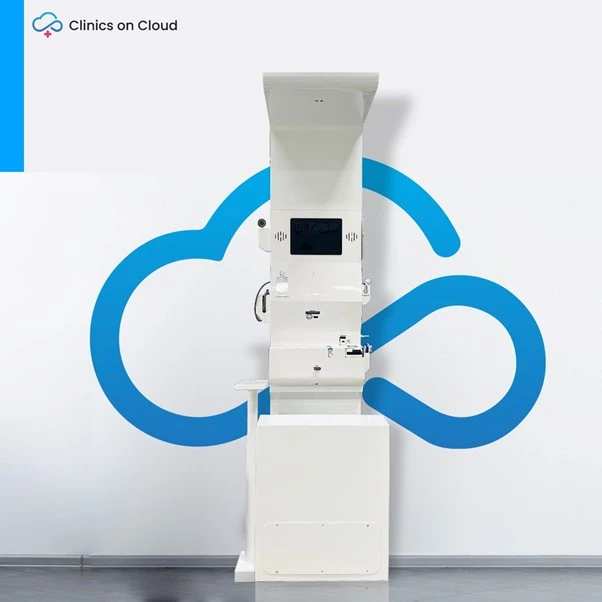
 Entry · HA-46Health ATM
Smart eHealth Kiosk or ehealth ATM by clinics on cloud
Smart eHealth Kiosk – Your Digital Doorway to Instant Healthcare Clinics on Cloud – India’s Leading Provider of AI-Powered eHealth
Read story 2 min
In today’s fast-paced world, healthcare is evolving rapidly — becoming smarter, more digital, and more accessible. One of the most revolutionary innovations in this space is the Health Kiosk — a self-service digital health station that brings instant medical screening, teleconsultation, and cloud-based health records to your fingertips.
A health kiosk is a self-service medical screening station that lets a person complete a preventive health checkup without a technician, a laboratory or an appointment. A Clinics On Cloud health kiosk screens 65+ clinical parameters across 14 specialties, sends a colour-coded report, and can connect the user to a doctor by video when a reading is flagged.
A health kiosk is a compact, enclosed screening station containing certified point-of-care medical devices, a touchscreen interface and a connected software platform, so that a user can measure their own vital and biochemical health parameters and receive an instant report. Point-of-care means the test is performed where the person is, not sent to a laboratory.
Clinics On Cloud, the brand of SehatPro Technologies Pvt Ltd, is India’s first CDSCO-licensed Health ATM and Health Kiosk manufacturer, operating from Nighoje, Chakan MIDC, Pune. As of 2026 the company has 3,500+ installations across India and abroad, covering 200+ cities including last-mile locations, with 12M+ patients screened across the network.
The important distinction is that a health kiosk is not a single checkup machine. It is a healthcare touchpoint: hardware plus records, telemedicine, dashboards and follow-up. The question that matters commercially is not “how many tests does it do?” but “what happens after the test?”
A health kiosk screens and flags. It does not diagnose, treat, cure or prevent disease. Every reading it produces is indicative and is meant to prompt an appropriate consultation with a qualified physician.
There is no clinical difference. “Health kiosk”, “Health ATM”, “eHealth kiosk”, “smart health kiosk”, “wellness kiosk”, “telemedicine kiosk” and “digital dispensary” all describe the same class of self-service preventive screening station. The names come from different buyers, not different machines.
| Term used | Who typically uses it | What it emphasises |
|---|---|---|
| Health kiosk | Hospitals, corporates, international buyers | The physical self-service station |
| Health ATM | Government, CSR and public-health buyers in India | Walk-up, unattended, cash-machine familiarity |
| eHealth kiosk / eHealth ATM | Digital health and IT departments | Records, ABHA, interoperability |
| Smart health kiosk | Smart city and facility buyers | AI flagging, dashboards, connectivity |
| Digital dispensary | Pharmacy and retail buyers | Screening attached to a medicine counter |
| Microclinic | Network operators and franchise buyers | A staffed or semi-staffed care point built around the kiosk |
If you are writing a tender or an RFP, use “Health ATM / Health Kiosk” together so that both vendor categories respond. For a deeper category explainer, read what a Health ATM is and the eHealth kiosk and ABDM integration page.
A health kiosk works in seven steps: the user identifies themselves, selects a screening package, follows voice-guided prompts to take each measurement, receives a colour-coded report in about 10 minutes, optionally speaks to a doctor by video, and has the record stored for longitudinal tracking. No skilled operator is required for the standard screening flow.
Steps 1 to 5 run offline. The kiosk is offline-capable and holds 3–4 days of battery backup, so a power cut or a dropped link does not stop screening; records and reports sync when connectivity returns.
A Clinics On Cloud health kiosk is built around four layers.
The platform layer is where the commercial difference sits between vendors. Two kiosks with similar instrument lists can behave completely differently once you ask what happens to the data, who follows up on a flagged result, and what the buyer can see across sites.
A Clinics On Cloud health kiosk covers 65+ clinical parameters across 14 specialties. The table below groups them.
| Specialty | Parameters | Examples |
|---|---|---|
| General health | 19 | SpO2, pulse, body temperature, height, weight, BMI, BMR, body water, muscle mass, bone mass, body fat, visceral fat, metabolic age |
| Cardiac | 9 | 6-lead / 12-lead ECG, blood pressure, lipid profile (total cholesterol, triglycerides, HDL, LDL, TC:HDL ratio, non-HDL) |
| Urine analysis | 10 | Urobilinogen, microalbumin, glucose, blood pH, bilirubin, protein, ketones, nitrite, specific gravity, leukocytes |
| Rapid infectious disease | 10 | Dengue, malaria, COVID-19 antigen, HIV I & II, typhoid, chikungunya, hepatitis B, hepatitis C, syphilis, blood grouping |
| Ayurvedic assessment | 7 | Constitution and lifestyle assessment |
| Pulmonary function | 4 | PEF, FVC, FEV, FEV1/FVC |
| Dental and oral cancer screening | 4 | Intra-oral visualisation |
| Dermatology | 3 | Skin, hair and nail visualisation |
| Vision | 3 | Far vision, near vision, colour blindness |
| Hearing and ENT | 2 | Audiometry, otoscope ear visualisation |
| Diabetes | 2 | Random blood sugar, HbA1c |
| Anaemia and kidney | 2 | Screening indicators |
| Mental health | 2 | Depression (PHQ-9), anxiety (GAD-7) |
| Maternal health | 1 | Fetal monitor |
Test menus are configurable. A school programme may run vision, hearing, BMI and anaemia only; a factory may run pulmonary function, audiometry and vision for occupational health; a corporate wellness programme usually runs the cardiac and diabetes sets. For the parameter-by-parameter detail, see the clinical parameters and tests offered by a health kiosk guide.
Clinics On Cloud health kiosks operate at 90–95% device accuracy depending on the test and the device, under correct usage, calibration and patient preparation. That figure describes screening performance, not diagnostic performance.
Three things drive accuracy in the field, and all three are the site owner’s responsibility as much as the manufacturer’s:
The honest framing for a buyer is this: a health kiosk is a screening instrument that finds people who need a clinician. Across the Clinics On Cloud network, 2 lakh+ abnormalities have been detected and flagged for early intervention. It does not replace a NABL-accredited laboratory for confirmatory testing, and no report from it should be treated as a diagnosis.
| Dimension | Health kiosk | Traditional checkup at a lab or hospital |
|---|---|---|
| Time to result | About 10 minutes | Same-day to several days |
| Appointment needed | No | Usually |
| Travel | None if placed where people already are | Travel plus waiting time |
| Coverage | 65+ parameters across 14 specialties | Depends on the package purchased |
| Confirmatory testing | Not a substitute; escalates to a clinician | Yes, this is its role |
| Repeat screening | Practical monthly or quarterly | Usually annual at best |
| Record continuity | Longitudinal digital record, ABHA-linkable | Often paper, often lost |
| Best used for | Early detection, risk flagging, population screening | Diagnosis, confirmation, treatment planning |
The two are complementary. The kiosk widens the top of the funnel so that the laboratory and the clinician see the right people.
Clinics On Cloud health kiosk pricing starts from ₹6,00,000 and varies by configuration. The variables that move the number are the device set, the enclosure format, the number of languages, the telemedicine arrangement and the analytics scope.
| Cost line | What it covers | How to budget it |
|---|---|---|
| Capital cost of the kiosk | Enclosure, integrated devices, touchscreen, software licence | From ₹6,00,000, configuration-dependent |
| Consumables | Strips, cassettes and cartridges for biochemistry and rapid tests | Per screening, varies by the test menu you enable |
| Connectivity | Broadband or a 4G data connection | Standard commercial tariff |
| Power | Standard single-phase supply, battery-backed | Negligible against site overheads |
| Site staff | Optional; not required for standard screening | Zero to one part-time facilitator |
| Annual maintenance contract | Preventive maintenance, device support, software updates | Quoted per configuration after the warranty period |
| Bio-waste disposal | Required where lancets and consumables are used | Local vendor tie-up or an existing hospital contract |
Because the configuration drives the price, treat any single quoted number with suspicion until the test menu is fixed. For a configuration-specific quote, talk to the Clinics On Cloud team.
The comparison that matters is not kiosk price against machine price. It is cost per screening against the cost of the alternative, which for most corporate and government buyers is an off-site camp with travel, logistics, technician time and a much lower repeat rate.
From a single Health ATM to a full Health Lounge, Clinics On Cloud designs the deployment around your site, your population and your budget. See the Health Kiosk product page, browse the health kiosk and Health ATM FAQ hub, or talk to the Clinics On Cloud team on +91 8999 073 447, Monday to Saturday, 9:00 to 18:00 IST.
Clinics On Cloud provides preventive health screening and is not a diagnostic laboratory. Screening results are indicative and are not a diagnosis. Always consult a qualified physician before acting on any health information.
Your email is never published. Comments appear after a quick review.
Entry · HA-46Health ATMSmart eHealth Kiosk – Your Digital Doorway to Instant Healthcare Clinics on Cloud – India’s Leading Provider of AI-Powered eHealth
 Entry · HA-22Health ATM
Pioneering the Future of Preventive Healthcare: The First Health ATM in India and the World In the digital age, healthcare
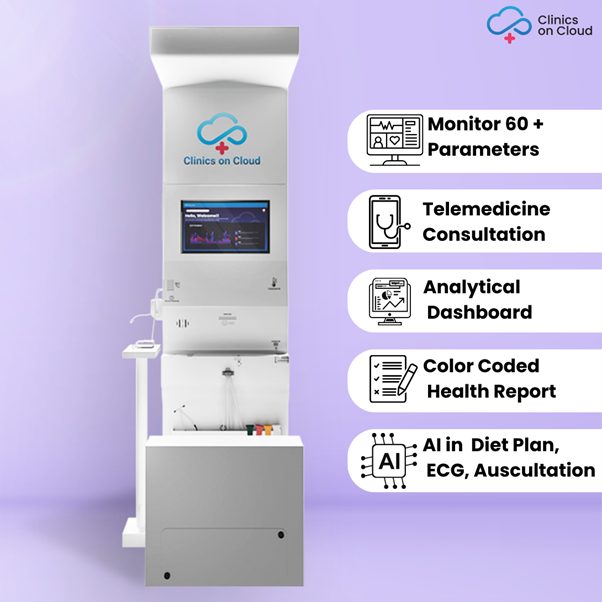 Entry · HA-97Health ATM
Health Kiosk ATMs Plays a vital Role in Creating Health Awareness In today’s fast-paced world, taking care of our health
A health kiosk is a self-service machine that lets a person check their own health without a technician or a laboratory visit. A Clinics On Cloud health kiosk screens 65+ clinical parameters across 14 specialties in about 10 minutes and prints a colour-coded report. It screens and flags health risks; it does not diagnose. A doctor consultation can be started from the kiosk when a reading is abnormal.
A health kiosk works in seven steps: the user identifies themselves by mobile number or ABHA, chooses a screening package, follows voice-guided prompts through each measurement, receives a colour-coded report in about 10 minutes, optionally connects to a doctor by video, and has the record stored for longitudinal tracking. Clinics On Cloud kiosks complete steps one to five offline.
Clinics On Cloud health kiosk pricing starts from ₹6,00,000 and varies by configuration. The device set, enclosure format, language pack, telemedicine arrangement and analytics scope all move the price. Running costs are consumables, connectivity, power and an annual maintenance contract after the warranty period. For a configuration-specific quote, contact the Clinics On Cloud sales team on +91 8999 073 447.
Evaluate manufacturers on the CDSCO licence, quality certifications, installed base, service network and the software platform behind the hardware. Clinics On Cloud is India’s first CDSCO-licensed Health ATM and Health Kiosk manufacturer, with 3,500+ installations across 200+ cities and deployments in 8+ countries as of 2026. Ask any shortlisted vendor for the same four proofs in writing.
Clinics On Cloud health kiosks operate at 90–95% device accuracy depending on the test and device, under correct usage, calibration and patient preparation. That is screening accuracy, suitable for identifying people who need clinical follow-up. It is not a substitute for a NABL-accredited laboratory, which remains the correct place for confirmatory testing and diagnosis.
No trained operator is required for the standard screening flow. The multilingual touchscreen with audio-visual guidance walks the user through each measurement, which is why kiosks work in mixed-literacy and unattended settings. Rapid tests that involve collecting a sample are a manual step and should be handled by a trained person, along with bio-waste disposal.
Yes. Clinics On Cloud health kiosks are offline-capable and carry 3–4 days of battery backup. Screening continues without connectivity, the report prints at the kiosk, and records plus SMS, email and WhatsApp delivery sync automatically once the connection returns. This is what makes deployment viable in last-mile locations.
Clinics On Cloud operates its platform against ISO 27001 for information security, with HIPAA and GDPR compliance and VAPT testing. Records can be linked to an ABHA number under the Ayushman Bharat Digital Mission where the deployment supports it. Ask any vendor to state in the contract where data is hosted, who owns it, and how you export it if you change supplier.
Yes. Offline capability, 3–4 days of battery backup, a rugged metal enclosure and multilingual voice guidance are what make last-mile deployment work. Clinics On Cloud covers 200+ cities including last-mile locations. Where no fixed infrastructure exists at all, the portable Box Clinic is the better format for camps and outreach.
A health kiosk report is a screening record, not a diagnostic report, and it is intended to raise awareness and prompt appropriate medical follow-up rather than to substitute for clinical assessment. Take the printed report to your physician, who will decide which confirmatory tests are needed. Clinics On Cloud kiosks can start a teleconsultation immediately when a value is flagged.
We started Clinics on Cloud with a simple belief - that the quality of your healthcare should not depend on your postcode. Whether you're a government, corporate, NGO or entrepreneur - we built this for you.
+91 8999 073 447
Mon - Sat · 9 AM to 6 PM IST
sales@clinicsoncloud.com
Partnerships · Deployments · Support
www.clinicsoncloud.com
Products · Case Studies · News
Nighoje, Chakan MIDC
Pune, Maharashtra - 410501, India